# Longeye --- Full Site Content
> Longeye is an AI-powered investigative workspace that helps law enforcement agencies analyze digital evidence 100x faster. It processes video, audio, phone extractions, social media, financial records, and images, then returns verified, source-linked answers to natural language questions. Every finding is linked back to the exact moment in the original source evidence, making it easy to verify and defensible in court. Longeye is SOC 2 Type II certified, self-hosted on AWS, and built to exceed CJIS security requirements.
---
## Home
Longeye turns mountains of digital evidence into actionable intelligence. Video, audio, phone extractions, social media, financial records: analyzed in minutes, not months. Every finding linked back to its original source.
### The Problem
The justice system is fighting a new enemy: information overload. In a single case, investigators may be buried under 80+ hours of interviews, 10,000+ images (CSI photos), 250+ hours of jail calls, and 15,000+ hours of CCTV and body cam footage. Longeye processes it all, so your detectives don't have to.
### Capabilities
Purpose-built AI that fits into investigative workflows. No training required, no complex prompts, no data shared.
- **100x Faster Analysis** --- Longeye's AI-powered workspace rapidly digests and understands video, photography, and text at speeds up to 100x faster than a human reviewer.
- **Every Evidence Type** --- One workspace for your entire case. Upload everything. Longeye processes it all and makes it searchable in minutes.
- **Relevance Ranking** --- The most critical evidence is surfaced first, ranked by relevance to each specific case context.
- **Verifiable Citations** --- Every answer links straight to the exact moment in a video, recording, message, or image. 100% verifiable and defensible.
- **Language Support** --- Real-time language support translates and transcribes content across languages including Spanish, Mandarin, and more.
- **Face Detection & Clustering** --- Automatically identifies and groups faces across thousands of photos and videos, surfacing every appearance of a person of interest.
### Trust AND Verify
Every insight Longeye provides is 100% verifiable. Every piece of key intelligence is directly linked to the original sources so findings are easy to check and defend in court.
- Direct links to original evidence sources
- Relevance scores for every finding
- Evidence-based report suggestions
- Built for courtroom defensibility
### Proven Results
Longeye is deployed across the country, from major metropolitan departments to state bureaus of investigation.
- **$1M+ ROI Value Generated** --- A state department of corrections surpassed $1M in investigator time savings during their pilot alone.
- **3 Staff Corruption Cases** --- Identified from a single query across 1,000+ jail calls. Cases that would have taken months to find manually.
- **853 Hours of Audio Processed** --- A large Rust Belt police department fed 10,000 calls into Longeye. Evidence that would have never otherwise been found, surfaced in days.
### Wins from the Field
- **South San Francisco PD (Homicide)** --- 25 hours of recordings reviewed in minutes. Detectives uploaded hours of jail calls and witness interviews. Longeye surfaced the key conversations and connections in a fraction of the time.
- **Oklahoma DOC (Financial Crime)** --- Financial fraud uncovered across thousands of records. Longeye analyzed the data, identified suspicious transactions, and surfaced the evidence needed to build a prosecutable case.
- **Oklahoma City PD (Homicide)** --- Confession found buried in a no-DNA case. A single query surfaced a recorded confession buried deep in the evidence, turning a cold investigation into a closed case.
### Why Longeye vs Civilian AI Tools
**Longeye:**
- No complex prompts needed, just ask a question
- Every finding linked to source evidence
- Self-hosted AI on AWS. Your data never leaves
- Video, audio, images, documents & social media
- 100+ language translation
- Case-level AI chat across all files
- SOC 2 Type II certified
- No data used for AI training
**Civilian AI Tools:**
- Requires expert-level prompting for results
- No source citations or verification
- Data sent to third-party servers
- Limited to text or single-file analysis
- Not built for law enforcement security standards
- Your data may train their models
### Security
Cybersecurity built well beyond CJIS requirements. Designed from the ground up with defense in depth: Live Scan Staff, SOC 2 Type II, Self-Hosted AI, Hosted on AWS, Sandboxed System, No Data Training.
### Testimonial
"Longeye has already proven its value, cutting months off of investigations, surfacing leads we might have missed, and even closing gaps in a cold-case homicide. Every hour Longeye gives back to my detectives is an hour invested in solving cases, supporting victims, providing closure and strengthening community trust." --- Chief Darrell Lowe, Redmond Police Department
---
## Product
Ask any question about your case. One prompt. Every evidence type. Longeye searches across your entire case: video, audio, phone extractions, financial records, social media. And returns verified, source-linked answers.
### Features
- **Rapid Evidence Ingestion** --- Drag and drop thousands of files at once. Longeye digests video, photography, audio, social media, cell phone data, and messages in seconds.
- **Contextual Search** --- Ask questions in natural language. Longeye contextually reads evidence to find key intelligence, ranking every finding by relevance.
- **Source-Linked Citations** --- Every answer links to the exact moment in a video, recording, message, or image. Findings are easy to check and defend in any legal proceeding.
- **Real-Time Translation** --- Translates and transcribes content across languages including Spanish, Mandarin, and more.
- **Automated Report Writing** --- Summarizes key evidence and helps detectives quickly write case reports, suggesting evidence-based additions.
- **Isolated Investigations** --- Privacy by design ensures AI models never train on case data and every investigation remains fully isolated.
### Investigative AI
Type a question in plain language and Longeye searches every video, recording, message, and image in the case. Findings are ranked by relevance and linked directly to the exact moment in the source evidence.
### No Prompting Expertise Required
You shouldn't have to memorize a three-paragraph prompt to get good information out of your evidence. Longeye is designed so any investigator can get powerful results from simple, natural questions.
### Audio & Media Analysis
Longeye transcribes and translates audio and video across languages, then surfaces every call on an interactive timeline, color-coded by AI relevancy score. Searchable transcripts across Spanish, Mandarin, and more. Call history timeline color-coded red/yellow by relevancy.
### Geospatial Intelligence
Longeye plots location evidence on an interactive map: GPS tracker pings, Cellebrite extraction data, CDR lat/long, and ALPR hits from networks like Flock Safety. A custom timeline slider animates movement over time across up to 10,000 data points with direction-of-travel arrows and automatic reverse geocoding.
### Financial & Tabular Analysis
Upload any spreadsheet or CSV (bank records, phone tolls, inmate commissary logs) and Longeye analyzes it natively. Ask a question in plain English and get an AI-generated chart, table, or summary back in seconds.
### How It Works
Instant onboarding. Multiple agencies have closed real cases in their first hour using Longeye. No integrations required. No training needed. Just upload evidence and start asking questions.
---
## About
At Longeye, we're taking a stand for truth.
### Our Mission
We think like detectives. And build like engineers. Longeye addresses a critical challenge facing modern law enforcement: the overwhelming volume of digital evidence in criminal cases. We believe that the certainty of being caught is one of the greatest deterrents to crime.
### Our Values
- **Balanced Justice** --- We're committed to strengthening the integrity of the justice process for all. Longeye plans to provide AI services free of charge to public defenders' offices.
- **Built With Investigators** --- A team that listens to the people we create products for. Longeye is the product of working side-by-side with police on the ground.
- **Privacy First** --- Our AI models never train on case data and every investigation remains fully isolated. Security built from the ground up with defense in depth.
### Team
- **Guillaume Delepine, Cofounder & CEO** --- A public safety and social justice advocate with a decade at the forefront of technology. Previously spent six years at Skydio building the public safety business. Princeton alumnus.
- **Danielle Man, Cofounder & CTO** --- A seasoned technologist. Before co-founding Longeye, she was Senior Director at Apollo GraphQL where she led the 40-person engineering group.
- **Matt Hoffman, Head of AI** --- Leading AI developer with experience at Weights & Biases, Snorkel, and Primer AI where he rose to Director of Professional Services. Cornell & Duke alumnus.
### Investors
Longeye has raised $5M in seed funding led by Andreessen Horowitz's American Dynamism Fund, with additional investment from Seven Stars Capital and strategic angels. Founded in 2025.
---
## Contact
Ready to see Longeye in action? Reach out for a demo or to learn more.
- **Headquarters:** San Francisco, California
- **Email:** info@longeye.com
Whether you're a law enforcement agency, a public defender's office, or a technology partner, we'd love to hear from you. As part of our commitment to balanced justice, Longeye plans to provide AI services free of charge to public defenders' offices.
---
## Blog Posts
### ABC7 News: How Longeye's AI is Helping Law Enforcement Crack Cases Faster (2026-03-28)
ABC7 News reports on how Longeye, a Bay Area AI startup co-founded by Guillaume Delepine, is transforming how law enforcement processes digital evidence. The segment features a live demonstration with South San Francisco Police Captain Anthony Penel, showing how Longeye analyzed 100 jailhouse phone calls from a felony case in seconds, identifying a critical conversation where suspects coordinated an alibi in Spanish.
The story highlights how 70 percent of investigators today do not have enough time to review all of their digital evidence. With surveillance footage, phone calls, texts, emails, and massive PDFs, the volume of potential evidence has exploded while detective staffing has stayed flat. Longeye streamlines this process, connecting dots across thousands of pages and hours of recordings that would take human reviewers days or weeks.
Newly retired San Ramon Police Chief Denton Carlson, who joined the Longeye team, calls the technology game-changing for law enforcement. The segment also highlights a case where a department's interpreter missed a confession buried in 30 hours of recorded calls that Longeye flagged immediately.
## Full transcript
Good old-fashioned police work solves crime. But in an increasingly digital world, shoe leather isn't always enough. Enter Longeye, a Bay Area AI startup co-founded by Guillaume Delepine, using artificial intelligence to help street-smart cops catch crooks.
**Tell me about the concept.**
Longeye is based on the fact that 70% of investigators don't have time to get through all of the digital evidence that they have to go through. There's just too much potential evidence to examine. On any given case, we're talking about surveillance camera footage, hours of phone calls, thousands of texts and emails, more evidence than ever. And in most departments, no more detectives than years ago.
When newly retired San Ramon Police Chief Denton Carlson saw the technology, he wanted to be a part of it and joined the Longeye team. The technology, he believes, is game-changing for law enforcement.
**You're one click away and you're going to the actual evidence to verify exactly what the AI has found for you. Not just searching the random internet. You're going to the evidence that you have inputted, basically.**
Exactly, with clear citations and direct links.
Captain Anthony Penel of South San Francisco Police was part of a real-world Longeye demonstration, using the AI tool to comb through 100 jailhouse phone calls from a suspect in a felony case.
**The system was able to point directly to the most relevant call, which ended up being one of our suspects discussing their alibi through a third party to plan an alibi with one of the other suspects.**
So what would have taken detectives hours and hours, if not weeks, to sort through, the Longeye AI tool did in just seconds. And what's more, it found that conversation in Spanish. It can do this in 100 languages.
Longeye co-founder Guillaume Delepine says the sheer amount of electronic evidence today is overwhelming. His creation streamlines the process and connects the dots.
**That sometimes are in 30,000-page PDFs, thousands of pages apart, all brought into one bullet point that helps the detective understand what's going on on the ground.**
Giving law enforcement a powerful new tool that changes how police do their jobs and how the bad guys get caught.
**You're making it very difficult for me to pursue the life of crime I'd always imagined.**
Here's another example. One department hired an interpreter to go through 30 hours of recorded phone calls. The interpreter found nothing. When they ran it through the Longeye platform, it immediately flagged a confession from the suspect that the interpreter had missed.
Longeye continues to expand to more than a dozen police departments around California and Arizona, with many more on the horizon.
---
### March Product Update (2026-03-01)
Spring is in the air, and so are new features! Happy March, everyone.
## Call history timeline
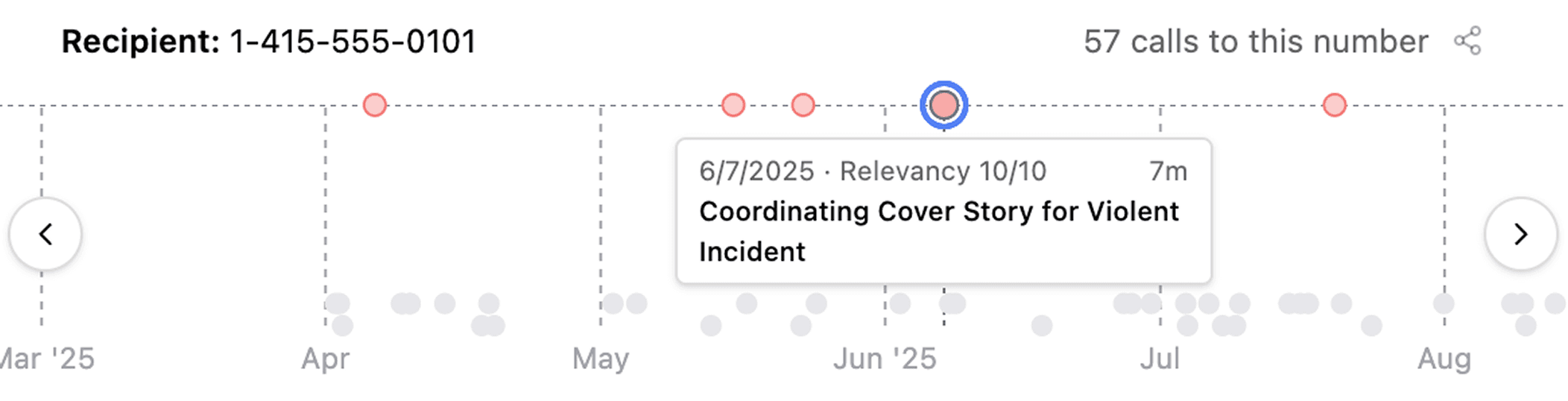
When you review large volumes of jail calls, Longeye now plots repeated calls to the same phone number on a timeline. We highlight relevant calls, and you can click different dots to jump from call to call quickly. We're hearing this has been really helpful for local PD's collaborating with federal units on fugitive searches.
## Analysis for extremely large PDFs
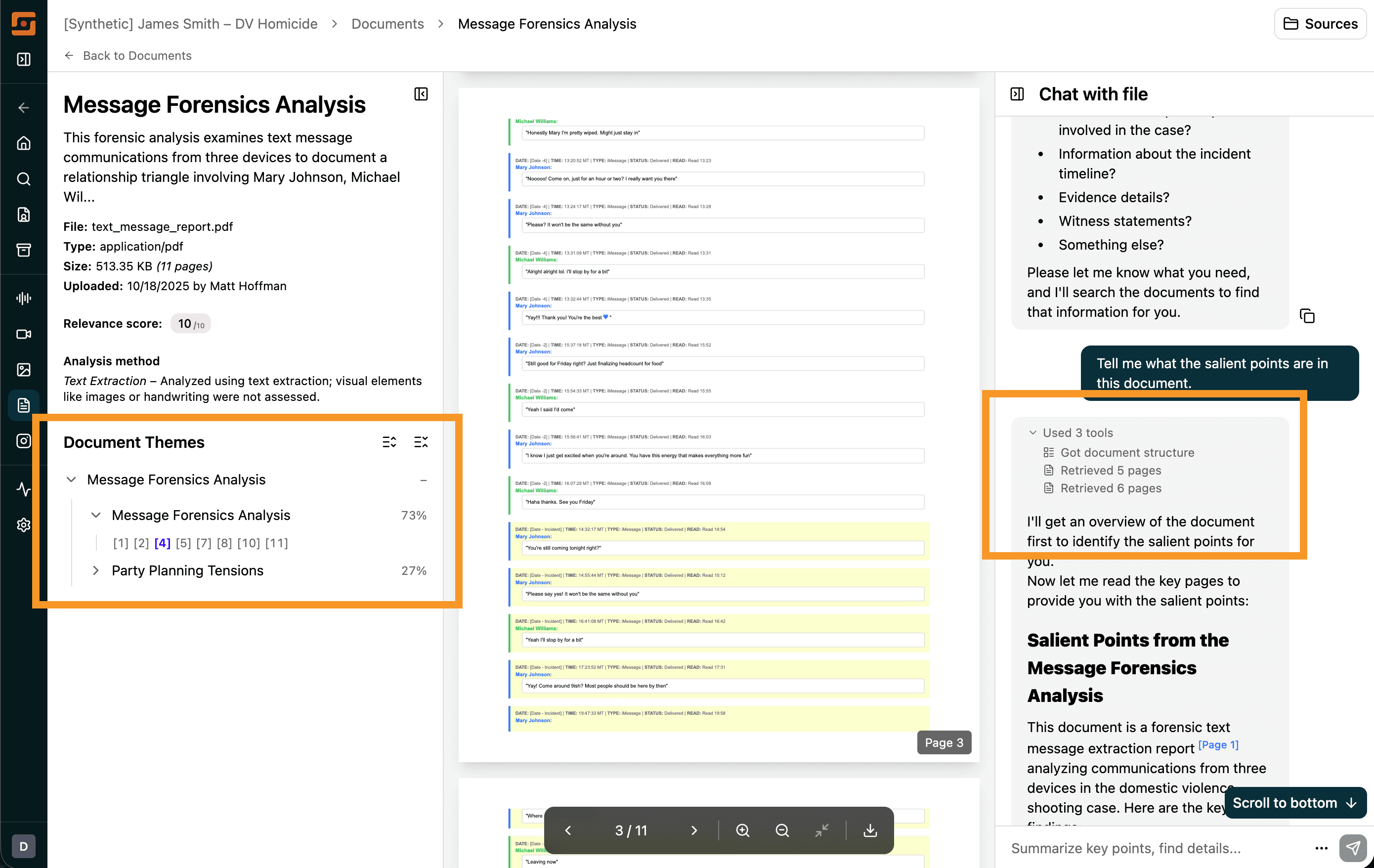
We've been working hard to improve support for PDFs with hundreds of thousands of pages (35MB+). This month, we introduced a new document detail page with a theme navigator that groups pages by the themes they discuss.
Document chat is also much better now: each time you ask a question, the chat bar explains how it's processing your question. PDF citations now cite specific lines, not pages, and content search is much more reliable.
## Saved chat history
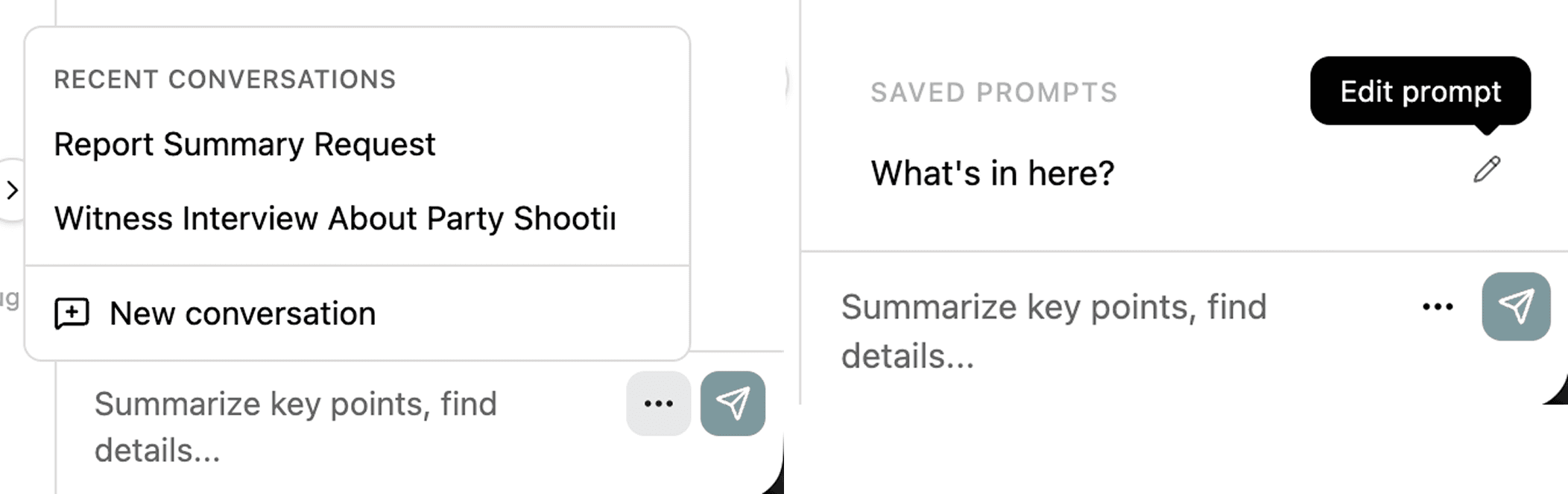
By popular demand, we finally built saved chat history. You can now revisit past chats and continue them—or start a fresh chat—right in the same spot. And, if you share with the org, your teammates can pick up where you left off.
In addition, you can now save chat prompts. If you frequently send the same prompt to different files, save it once and reuse it next time.
## Thematic Search is live in Audio & Video
You can now search thematically through audio and video transcripts. For example, if you're looking for something like "gun," you can type "handgun" or "violence" and it will come up.
Search across audio and video now also works across languages—so even if the transcript is in Spanish, you can search in English and still find it.
## Improved image captioning
In user testing we are observing fewer false positives in image captioning and improved image relevance scoring.
## Case management
- **Org admins can now manage users directly!** You can invite new users, reset their passwords, and reset their authenticators—all without contacting the Longeye team.
- You can now override a file's relevance with a thumbs up or thumbs down. This automatically sorts it to the top or bottom of your list.
- We now detect common operating system files and skip them by default. You can still view them on your evidence page and request processing, but we won't process files we recognize as common device files (like icons and application files) unless you ask.
- The file upload progress indicator in the bottom-right corner is now draggable, in case you want to move it around your screen.
- When you upload folders and ZIP files, you can now name them, and we preserve their folder structure to keep you organized as you work the case.
- Face clusters pulled from your images are now sorted by relevance, so you don't see thousands of celebrity photos high up in your filter options.
## Other improvements
- AI-generated case summaries now appear on the Case Details page, giving you an instant overview of your case as soon as processing completes.
- You can now search for exact phrases in audio and video transcripts by wrapping your search in quotes.
- PDF citations now spotlight the exact cited text on the page, not just the page number.
- Unread indicators now show which audio and video tracks you haven't listened to yet, so you can track your progress through evidence.
- We improved processing of Snapchat exports with better data labeling and classification.
## Under the hood
We fixed over 300 smaller issues. We've improved ingest speeds, continued to work on reliability, and we're currently improving metadata extraction from Cellebrite UFDRs.
---
### How Investigations Break Down at Scale — and What Agencies Can Do About It (2026-02-15)
Investigations rarely lose momentum because of a single mistake. More often, they slow down gradually. Detectives stay busy, but progress becomes harder to measure. Conversations shift from theories and leads to questions like, "Are the calls reviewed yet?" or "Did the extraction finish processing?" The work continues, but the case itself is no longer moving forward.
That drift usually has one root cause: the volume of [digital evidence has grown](https://www.nicepublicsafety.com/resources/digital-evidence-management-system-dems-guide) beyond the workflow built to manage it. These breakdowns are not dramatic. They accumulate quietly until days or weeks have passed, and by then the impact is already visible across interviews, follow-ups, and charging decisions.
## Evidence Volume Outpaces Sequential Review
Cases still begin in familiar ways, a burglary, an assault, a shooting. What breaks workflows is what arrives next.
If you work investigations today, you've opened inboxes containing hours of body-worn camera footage, multiple device extractions holding years of messages and app data, social media warrant returns spanning thousands of pages, and unlabeled folders of images and video clips. [National Institute of Justice](https://nij.ojp.gov/topics/forensics/digital-multimedia-evidence) guidance confirms digital evidence now appears in nearly every crime type, not just cyber cases.
Traditional sequential review made sense when evidence fit one folder. Today the caseload math no longer works:
- One detective typically manages 15-25 active investigations
- Average case requires 45 hours of digital review
- Manual workflows collapse under that sustained volume
When investigators spend most of their time just opening files and navigating formats, less attention reaches the connections that actually solve cases.
## Late Context + Fragmentation Creates Drift
You've probably experienced this: a key detail surfaces weeks after your first interview. A confession buried deep in call lists. You pick up a cold case that's been worked by four different detectives - all retired. A timeline contradiction hiding in thousand-page PDFs. Images that change everything, discovered after witnesses are already debriefed.
[Police1 reports](https://www.police1.com/what-cops-want-2023/articles/survey-results-indicate-urgent-need-for-comprehensive-workload-analysis-and-service-delivery-revamp-F2ixCHtt8jZUmtZA/) investigators now describe their work as "digital triage," routinely skipping evidence portions just to maintain case velocity. Early decisions get made on partial information:
- Interviews proceed without critical background
- Follow-ups target incomplete leads
- Prosecutors receive technically accurate but fragile case updates
None of this reflects a lack of effort. When evidence review lags behind case momentum, every downstream step rests on incomplete context. Cases don't stop, they drift.
## Fragmentation Turns Verification Into Parallel Work
The real challenge isn't evidence complexity. It's fragmentation across disconnected systems.
A jail call timestamp aligns with an interview statement. A screenshot contradicts a suspect claim. A video shows a location mentioned in a transcript. [Investigators know these connections matter](https://nij.ojp.gov/topics/forensics/digital-multimedia-evidence), but tracking them manually across separate tools exhausts cognitive bandwidth.
Verification becomes its own investigation. Digital forensics programs report analysts spend most time on these steps:
- Relocating the exact insight moment
- Confirming surrounding context
- Validating original source file
- Documenting clearly for prosecutors
Supervisors notice when updates slow. Prosecutors notice when sourcing requires extensive reconstruction. Cases lose momentum not because evidence doesn't exist, but because defending it takes longer than finding it.
## Capacity Declines While Workloads Grow
Investigative teams face evidence growth from one direction and capacity pressure from every other.
[PERF's 2023 staffing survey](https://www.policeforum.org/staffing2023) found sworn officers [down 5%](https://www.policeforum.org/staffing2023) from 2020-2022, resignations up nearly 50% vs pre-2019 levels. [Cellebrite's 2024 digital forensics survey](https://www.police1.com/police-products/investigation/evidence-management/cellebrites-2024-industry-trends-survey-reveals-urgent-digital-challenges-in-law-enforcement) showed 67% reporting growing workloads, 52% expecting worsening backlogs.
Municipal budget pressures compound this, [expenditures now outpace revenues](https://www.nicepublicsafety.com/resources/digital-evidence-management-system-dems-guide), leaving investigative vacancies unfilled and digital forensics under-resourced. The result: more data arriving faster than the hours available to process it.
## Agencies Adjusting Through Workflow Changes
[Leading agencies](https://nij.ojp.gov/topics/articles/improving-collection-digital-evidence) aren't solving this through longer hours. They're changing how work advances from intake forward.
Common patterns among teams keeping pace:
- Triage immediately - context builds as evidence arrives, not after full datasets complete
- Relevance-first - focus on key people/times/locations vs opening files by load order
- Unified formats - audio/images/docs/video form one narrative view early
- Source-linked insights - notes tie directly to original files for instant verification
These changes protect what investigators do best. Interviews sharpen with better context. Follow-ups happen sooner because leads surface earlier. Prosecutors receive clearer updates with stronger sourcing. The workflow finally matches the evidence scale.
Leaders frame the goal simply: reduce data-heavy administrative time, maximize judgment and community knowledge where they matter most.
But any new tools must meet [investigator standards](https://www.justice.gov/olp/media/1381796/dl): traceable insights, defensible conclusions, security compliance. Next, we'll examine what investigators need from AI tools to trust them in mission-critical workflows, focusing on verification, defensibility, and CJIS-aligned security that holds up under courtroom scrutiny.
---
### February Product Update (2026-02-01)
We're showing your evidence some love this February. Here's what's new this month.
## [Evidence.com](http://evidence.com/) Integration with Axon
You can now import files directly from Axon [Evidence.com](http://evidence.com/) into Longeye. Folder structures are preserved, and files stream directly to your case without manual downloads. This feature is available by request—just let us know if you'd like it enabled for your organization.

## Find the Right Images, Faster
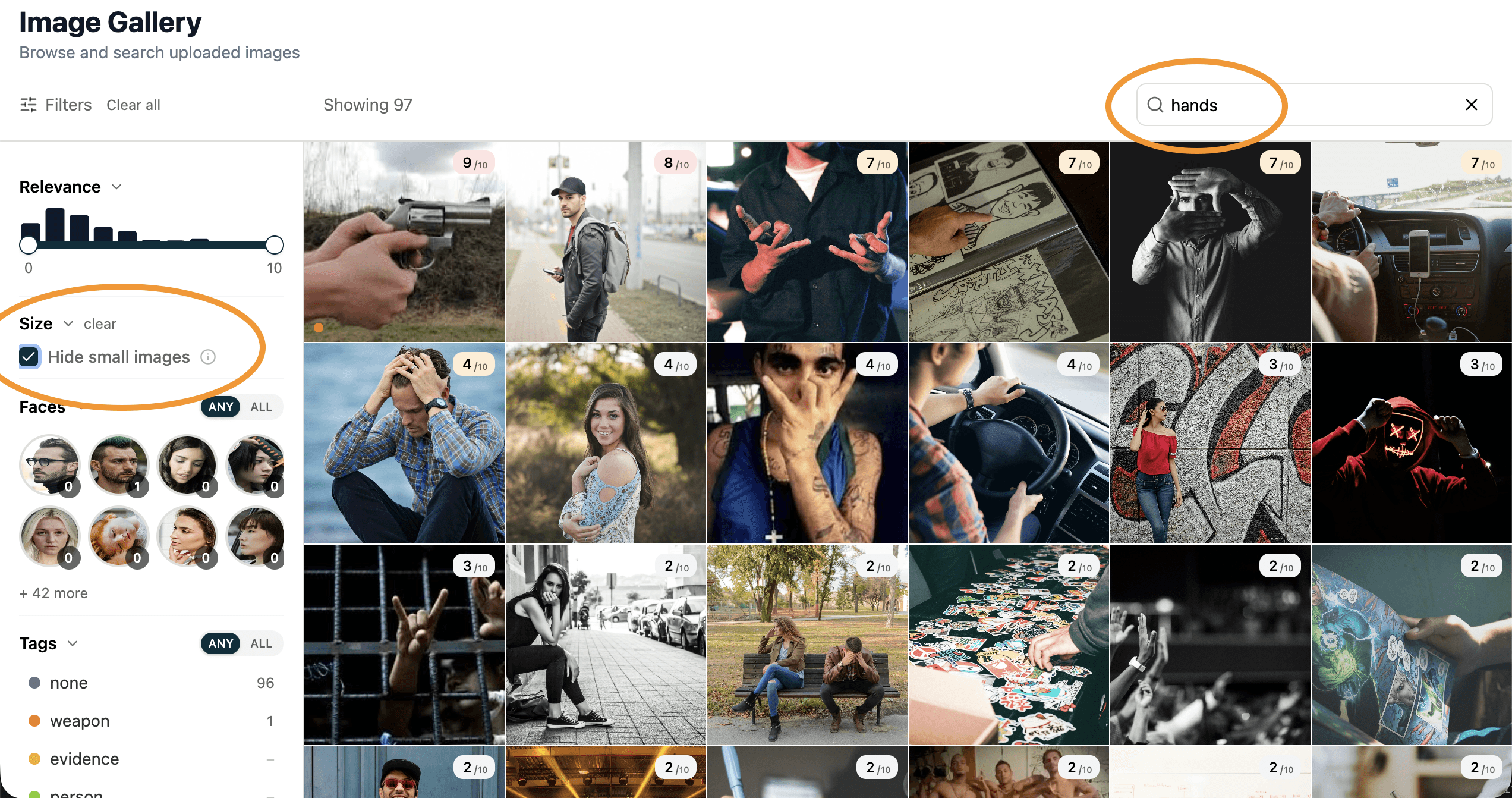
- **Search by AI relevance notes** — When our AI analyzes your images, it notes why each one might matter—"shows suspect," "potential weapon," "document evidence." You can now search these notes directly to find exactly what you need.
- **Hide small images** — One toggle filters out icons, thumbnails, and other visual noise so you can focus on meaningful evidence.
## New Filters in Explorers
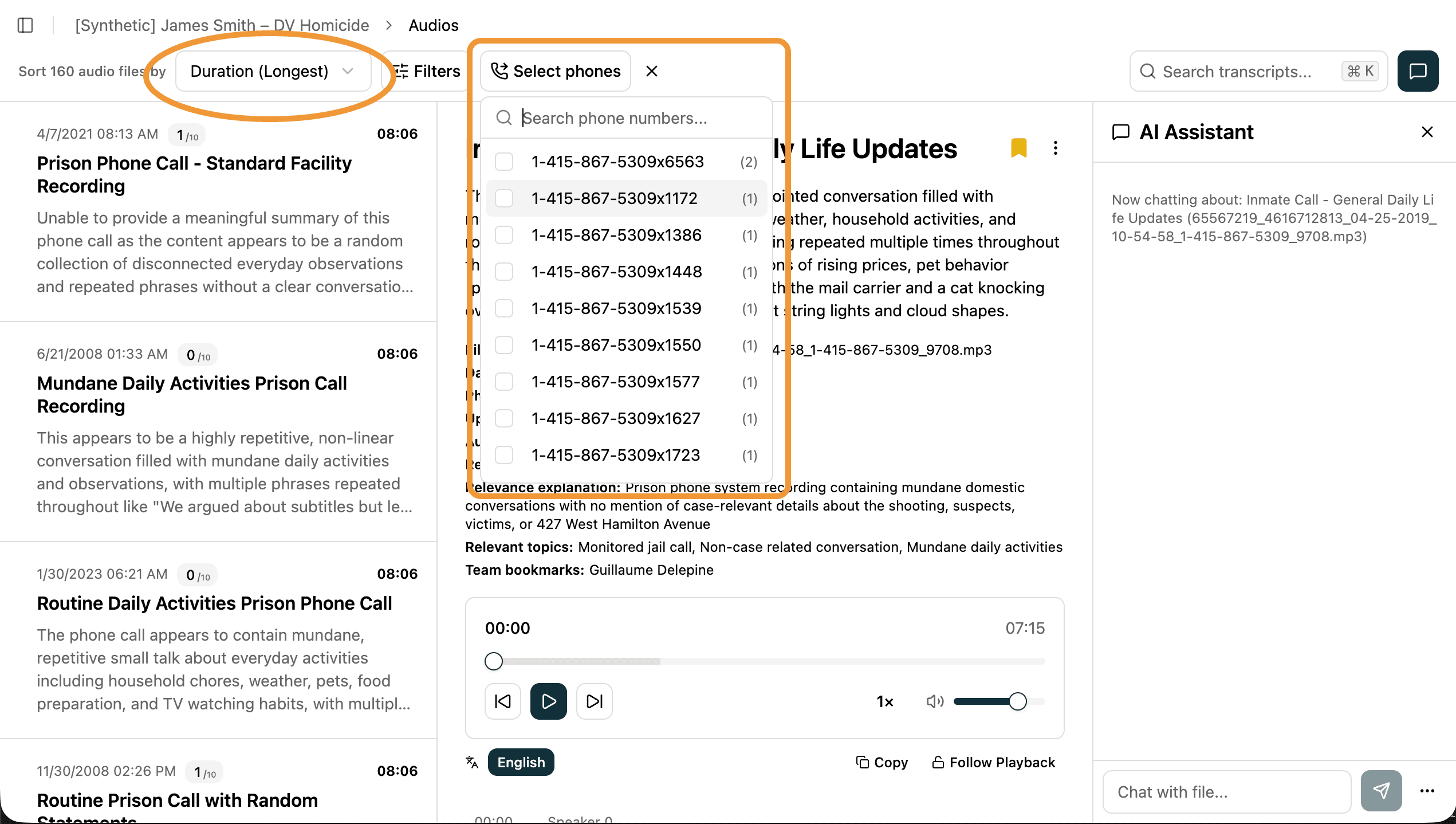
- **Filter calls by phone number** — Multi-select filter on the Calls page lets you quickly find all recordings involving specific phone numbers.
- **Filter by file type** — New dropdown on the Evidence page lets you show only PDFs, audio files, images, or other types.
- **Sort audio/video by duration** — Find short clips or long interviews instantly with the new duration sort option.
## Smarter AI Chat
- **Chat scope toggle for social media** — Choose whether you want the AI to focus on just the current conversation or search across your entire case.
- **Custom formatting** — Ask for summaries in your preferred style—bullet points, narrative, or anything else.
- **Copy AI responses** — Easily copy any summary or chat response to paste into your reports.
## Audio, Video & Documents
- **Copy transcripts** — New button lets you copy the full transcript with one click. Works with translated transcripts too.
- **Word documents viewable as PDFs** — We now convert .doc/.docx files automatically, preserving comments so you can view them directly in your browser.
- **PDF titles in chat** — Document chat now shows the actual PDF title instead of the filename.
- **Large PDFs load smoothly** — Massive PDF reports (like Cellebrite exports) now load in your browser with page-by-page navigation, so you can scroll through thousands of pages without waiting.
## Navigation & UX
- **Redesigned Home page** — Two-column layout keeps your case metrics visible while you explore themes and highlights.
- **Redesigned Image filters** — We moved the filters on the Image page into their own column on the left side so that you can focus as much screen space as you'd like on viewing the images themselves, as we continue to make Image analysis even better with more filters in the future.
- **Deep-linking from Files page** — Click the audio, video, or image badge on any file to jump directly to that item in the explorer.
- **Incident alerts** — If we're experiencing issues, you'll see a status banner in the sidebar.
- **Password-protected files** — Now clearly labeled instead of showing confusing error messages.
## Wins from the Field
Every month, investigators across the country use Longeye to break cases faster. Here are a few recent highlights:
- **South San Francisco PD** — During an on-site training, a detective uploaded 25 hours of jail calls from an attempted homicide case. Within 5 minutes, Longeye surfaced a Spanish-language call where the suspect instructed his girlfriend to coordinate alibis with his co-defendant's girlfriend.
- **Oklahoma DOC** — An investigator uploaded PayPal and Green Dot records from a fraud victim. Longeye identified the payments that matched the exact amounts and timing the victim had described, saving hours of manual review.
- **Oklahoma City PD** — A Spanish-speaking officer had reviewed jail calls and reported nothing relevant. When the detective ran the same calls through Longeye, the AI found a confession buried in just a few seconds of audio that had been missed, which provided critical evidence in a case with no DNA.
**Have a win to share?** We'd love to highlight your work. [Submit your story here →](https://forms.gle/2F4bwGCnZNVb1PA56)
## Tip from Investigators
**Export PDF reports from Cellebrite.** When you export a Cellebrite extraction as a PDF report, Longeye can search through text messages, emails, call history, and more—all at once. It's a fast way to surface what matters across an entire phone dump.
## Under the Hood
We fixed **45+ bugs** this month, including face bounding boxes not appearing on images, citation links breaking in social media chat, and large ZIP files (100GB+) failing to extract.
**Performance:** Evidence page search is now near-instant thanks to a new database index—no more waiting when you have thousands of files.
**Reliability:** Large file uploads can now be resumed if they're interrupted. Just re-select the same file to pick up where you left off.
**Security:** We patched 2 authentication vulnerabilities and added encryption across additional storage services to keep your data protected.
---
### January Product Update (2026-01-01)
Happy New Year from the Longeye team! We've been hard at work making Longeye faster, smarter, and more reliable for you. In the last month, we've shipped over 170 improvements to the app, ranging from new features to performance enhancements to critical bug fixes.
## New Features
## Face Detection & Clustering
Longeye now automatically detects and clusters faces across all images in a case. This means you can:
- **Filter by face** — Click on a face thumbnail to instantly find all images containing that person
- **See face clusters** — View how many photos each person appears in ("this person is in 15 photos")
- **Label people** — Name your clusters for easy reference (hover and edit inline)
- **Face bounding boxes** — See exactly where faces are detected in the lightbox view
## Chat with Text Files
You can now chat with plain text files (.txt, .log) using AI! Ask questions about the document and get answers with clickable citations that highlight the exact text being referenced. Perfect for quickly navigating lengthy documents.
## Smarter Audio & Video Summaries
Our new two-pass AI summary system generates more accurate summaries of audio and video transcripts. The AI first drafts a comprehensive summary, then reviews it against the original transcript to fact-check and improve accuracy — all with timestamped citations you can click to jump right to that moment.
## Delete Evidence Files
Case admins can now permanently delete evidence files. Select multiple files at once, confirm the deletion, and they're removed immediately from your case. (Files are retained in storage for 7 days before permanent deletion, just in case.)
## Read-Only Case Access
New **Case Viewer** role lets you give users read-only access to specific cases. Viewers can browse evidence and chat with files, but can't upload or modify anything. Great for supervisors or external reviewers who need visibility without edit access.
## Deep-Linking from Evidence Page to Explorers
Click the new enrichment badges on the Files page to jump directly to the Audio, Video, Images, or Documents explorer with that file in focus. No more hunting through pages to find what you're looking for!
## Bug Fixes
- **PDF processing** — fixed some parsing failures for special characters
- **Investigator notes** can now be saved even when very long (was hitting a size limit)
- **ZIP file extraction** handles edge cases better with improved compression ratio calculations
- **Multi-tab sessions** no longer conflict during file uploads
- **Audio & translation improvements** — better speaker identification and improved language translation accuracy. Citations on the summaries for audio and video files are now faster to load.
That's a wrap on the end of 2025! We're so excited to be back at it in 2026 with fresh energy and well-rested brains. As always, find us at [support@longeye.com](mailto:support@longeye.com) if you have questions or run into any issues.
---
### The Hidden Costs of Manual Evidence Review (2025-12-15)
If you spend time around investigators, a pattern quickly stands out. They rarely complain about the dangerous parts of the job or the unpredictable hours. What wears people down are the long stretches of digital review that no one outside the work ever sees. Hours spent inside outdated audio players and document viewers, watching transcripts, chat logs, and exported data load at a snail's pace. Nights spent combing through tens of thousands of pages that still leave unanswered questions.
Manual evidence review used to be manageable. Today it is one of the most time-consuming and mentally draining parts of investigative work, and many agencies are just coming to recognize how deeply it affects both investigators and case timelines.
## Evidence Piles Up Faster Than Agencies Can Review It
Across agencies, investigators describe review sessions that look less like structured analysis and more like digital triage. A detective may start the evening with dozens of audio clips, a multi-thousand page PDF, a device extraction filled with years of messages, and a folder of images that may or may not be relevant. All of it opens slowly. None of it is connected. Each piece requires separate tools and separate attention.
This is not an edge case. It is increasingly normal in many jurisdictions. To understand the scope of the shift, consider the pace of evidence growth:
We know this problem is universal. A [study from the National Institute of Justice (NIJ) found that the digital evidence required per case increased by 80% in one year alone](https://nij.ojp.gov/topics/articles/digital-evidence), demonstrating just how fast this volume is expanding.
The evidence changed faster than the workflow, and investigators were left to absorb the impact without additional time, tools, or staffing.
## Manual Review Slows Investigations Before Anyone Notices
Cases rarely break all at once. They slow down in small, subtle ways and begin to drift.
A detective sees the files that load fastest instead of the ones that matter most. A prosecutor receives an update that is technically correct but incomplete.
These small delays stack quickly and compound across the life of a case. When review cannot keep up with the pace of incoming evidence, early decisions are made on partial information. By the time critical details surface, the best window to use them may have already passed.
## Evidence Overload Drives Burnout and Attrition
Detectives expect long hours and difficult subjects. What they do not expect is how isolating digital review can become. Listening to disturbing audio alone at the end of a shift. Sorting through graphic or emotionally heavy screenshots. Switching between tools that do not talk to each other. Trying to keep track of timelines while moving across formats that were never meant to align.
Much of this happens after hours because investigators need to spend the day contacting suspects and supporting victims. But the mental load accumulates. The fear of missing something important is always there. It is a quiet pressure that rarely appears in official documentation but has real effects on morale. This intense cognitive burden directly impacts staffing and agency health:
The impact of this burnout is clear. A [2023 survey from the Police Executive Research Forum (PERF) highlighted that the high mental and administrative workload is a driving factor in the retention crisis, with 47% of agencies reporting that the number of resignations increased in the previous year](https://www.policeforum.org/staffing2023).
This is why many leaders recognize that the solution lies in smarter tools, not just harder work:
As the former President of the International Association of Chiefs of Police (IACP), Chief Steven R. Casstevens, noted, ["It's imperative that we equip our officers with technology that not only enhances safety but also reduces the administrative and cognitive burden, allowing them to focus on community engagement and complex investigations"](https://www.theiacp.org/iacp-technology-center).
The math bears this out as well. We recently saw a homicide case with 850+ hours of jail calls and 50,000+ pages of PDF documents to review. Even if a detective worked 2x as hard, there's no way to get through that while other cases keep coming in. We need to give investigators access to products that enable them to move 100x as fast.
## Manual Review Wastes High-Value Investigative Time
The cost of manual review is not just the number of hours spent. It is the value of the hours being spent.
Though salaries vary widely by region, the average detective costs an agency roughly one hundred and sixty-seven thousand dollars annually when salary, benefits, equipment, and training are included. Prosecutors and public defenders cost even more. These are some of the most precious hours in the justice system.
When those expensive hours are consumed by tedious sorting, the case itself suffers:
This loss of focus has measurable consequences. ["Every minute an investigator spends on menial, manual sorting is a minute they aren't spending building the case narrative or interviewing a key witness," stated a technology lead quoted in Police Chief Magazine, "and that directly impacts the likelihood of solving the case"](https://www.policechiefmagazine.org/improving-clearance-rates-in-investigative-case-management/).
When investigators spend days watching, listening, and sorting through material that does not require detective-level judgment, the agency loses time it can never recover. Cases move slower. Staffing pressure increases. And the people doing the work feel the strain most directly.
## Agencies Are Shifting Workflows to Keep Up with Evidence Scale
The agencies keeping pace with Big Evidence are not doing it through longer hours or larger teams. They are adjusting their workflow.
They start review earlier. They begin with relevance, not file order. They bring formats together sooner, so audio, images, documents, and video strengthen each other. They expect every insight to tie back to its source immediately.
These adjustments give detectives time back. Interviews improve. Case updates become clearer. Follow-up work happens faster. The job regains its rhythm.
Investigators did not choose for review to take over their work. It simply grew to fill the space as evidence multiplied. Agencies that recognize this and shift their workflow are already seeing cases move faster and teams experience less strain. The ones that wait will feel the pressure grow each year. The volume is not going to shrink, but the approach to handling it can evolve. And when it does, investigators get to return to the parts of the job that truly require their judgment, experience, and presence in the community.
In the next article, we'll look at a question every agency is now facing: if traditional workflows are falling behind, can new tools like AI help investigators keep up — and what would it take for them to trust those tools?
—
*Guest contributor* [*Antoine Sawadogo*](https://www.linkedin.com/in/antoine-sawadogo-53b8252a3/) *studies criminology and human rights at the University of Lille, with experience supporting judges, court systems, prosecutors, and defense attorneys.*
---
### December Product Update (2025-12-01)
Hi! We hope you're all staying warm and cozy out there. Our team has been hard at work making Longeye faster, smarter, and more reliable for you. In the last month, we've shipped over 200 improvements to the app, ranging from new features to performance improvements to bug fixes.
## Mobile Device Forensics Made Easy
**Cellebrite UFDR files are now supported.** Upload forensic extractions from mobile devices and Longeye will now automatically parse all their contents into the Explorers, just like with ZIP files.
## Better Transcription Quality
You'll now see quality warnings when Longeye is unable to confidently parse a transcript—so you know when to trust the AI transcription and when to listen to the original audio. We added detection for transcript gaps, as well as a fallback audio model, to improve the quality of our transcript coverage.
## Image Metadata and Annotations
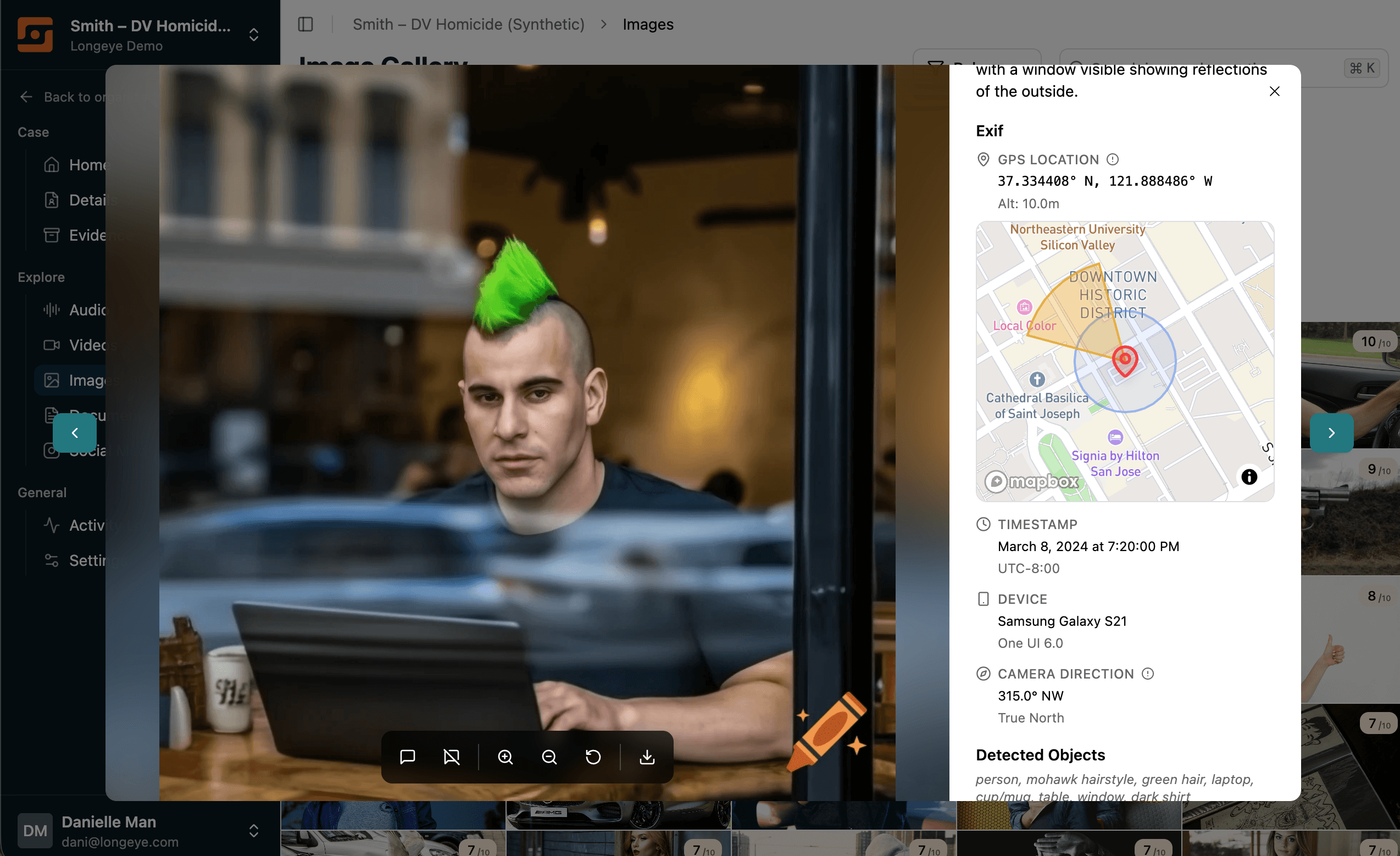
Photos now extract EXIF metadata when available, and display that GPS information on an interactive map:
- GPS location on an interactive map with accuracy radius
- Timestamp with timezone information
- Device make and model (iPhone 14, Pixel 8, etc.)
Images now also support tagging & comments, so you can group like images together, leave notes for yourself and your teammates, and export grouped images for your reports extremely easily.
## More New Capabilities
- **Word-by-word highlighting for audio and video.** Words now highlight in real-time on the audio and video playbacks, making it much easier to follow along on transcripts. This even works while following the English translation of transcripts in other languages.
- **Timestamp extraction from audio and video filenames.** We added support for a bunch of new date formats found in the names of audio and video files. If your files have timestamps in their names, but we're not yet extracting them, just let us know!
- **Date filters for audios and videos.** You can now filter to the specific time of occurrence for audio and video files.
- **Relevance filters on every page.** You can now filter by relevance in every single Explorer.
- **Large PDF chat.** We're working hard to support chat and parsing for increasingly large PDFs. You can now chat with PDFs with thousands of pages, and we're working to support PDFs with hundreds of thousands of pages as well and more.
- **Increased support for Video and Image file formats.** You can now browse HEIC image files directly in Longeye. We support playback for an increasing number of video formats and rendering for an increasing number of image formats.
- **Files process sooner.** Data ingestion will now start processing your files the moment we receive the first one, as opposed to the moment we finish receiving the batch. This gives you your first results in just minutes, even when uploading very large batches of data.
## Bug Fixes that Mattered
We squashed many bugs that were blocking your workflows, particularly around loading complex file formats and very very large files. We gave a lot of TLC this month to our file transcripts, and made the transcript quality, playback, and citations all much more transparent for you.
## What's Coming?
Some things that we're particularly excited about in December include supporting increasingly large PDF files, image clustering around similar objects & people, and expanding the scope of chat to your entire case as opposed to individual files. Stay tuned for updates on these things and more in our next newsletter in January.
We hope you all enjoy a wonderful and peaceful holiday season. If you have any questions or feedback, don't hesitate to reach our team at [support@longeye.com](mailto:support@longeye.com).
---
### Is Your Agency Keeping Up With Big Evidence? (2025-11-15)
If you work investigations today, you have probably felt the shift even if no one has named it. A warrant return arrives as a multi gigabyte PDF instead of a few pages. A batch of jail calls appears in your inbox before you have finished the last one. A phone extraction stalls your computer. A single case generates more digital material in a week than older cases generated in months.
These moments add up to one clear reality.
Evidence load did not just increase. It exploded past the limits of the workflow built to handle it.
If you feel those things, welcome to the era of Big Evidence.
## What Big Evidence Actually Means
Big Evidence is not just a large collection of files. It is the point where the volume, variety, and speed of digital evidence surpass what a traditional human centered workflow can reasonably process. It is evidence that grows faster than your available hours. It is evidence that arrives fragmented across many formats. It is evidence that contains the answers but hides them inside overwhelming scale.
Digital evidence is also now present in about [90 percent of criminal cases](https://www.policechiefmagazine.org/building-stronger-bonds-osint-digital-forensics-magnet/), according to recent reporting in Police Chief Magazine. The average case has five devices and [60 hours of material to review](https://www.police1.com/police-products/investigation/investigative-software/why-ai-and-cloud-solutions-are-no-longer-optional-for-police-investigations). And as a result, [70% of investigators tell Police1](https://www.police1.com/police-products/investigation/investigative-software/why-ai-and-cloud-solutions-are-no-longer-optional-for-police-investigations) they don't have enough time to go through all their digital evidence.
That means nearly every investigation today involves digital material that is more complex and more demanding than workflows originally designed for it. And investigators aren't keeping up.
Most agencies are already operating in this reality, even if they have not started calling it by name.
## What Big Evidence Looks Like in Real Cases
Across the country, the size of digital evidence has expanded far beyond what most investigative teams were built to manage. Industry research highlights [steady growth in body worn cameras, in car video systems, and digital evidence management platforms](https://ijis.org/wp-content/uploads/2024/05/LEITTF-Digital-Evidence-Whitepaper.pdf).
Agencies are generating more video, audio, and digital media than many back end systems were originally designed to support.
On the ground, that trend shows up in cases like these examples from real cases worked with Longeye:
- More than three thousand hours of jail calls spread across four thousand files in a cold case review
- Sixteen thousand pages in a single social media warrant return
- A one terabyte device extraction filled with years of messages, photos, and app data
- Hundreds of multilingual calls needing rapid triage
In some departments, the daily output of calls alone can consume more than a year of listening time for a single investigator. This pattern appears across agencies of every size, from small municipal departments to large county sheriff offices.
The trend is unmistakable. Evidence volume is rising faster than the capacity to handle it.
## How Cases Lose Momentum
Cases rarely stall all at once. They drift.
A detective opens the files that load fastest instead of the ones that matter most.
An interview moves forward because the witness is available before the core context arrives.
A prosecutor receives an update that is accurate but incomplete.
These delays stack quietly. After a few days, the case is no longer moving on the timeline it needs. The best windows for follow up work narrow. Leads go cold.
Big Evidence changes timing, and timing shapes outcomes.
## The Strain Investigators Carry
The shift also changes the day to day experience of investigative work. More evidence means more screens, more time spent inside large documents, more audio reviews late in the day, and more device exports that need several attempts to load. Less time supporting victims and contacting suspects.
Investigators push through all of it because they care about their cases, but the unstructured volume adds pressure. It takes time away from the core work they are trained to do. Verification becomes harder. Cognitive load increases. None of this shows up in reports, but it affects the job every day. Nobody wants to hear echoes of jail calls in their sleep.
## Why This Problem Is Not Going Away
Every trend but one in digital evidence points in one direction.
Devices store more.
Cloud platforms archive deeper histories.
Messaging apps generate denser threads.
Body cameras record longer sessions at higher quality.
Courts continue requesting more documentation, not less.
And as Police1 recently wrote, [the explosion of affordable video technology is rapidly increasing the number and types of digital evidence sources, overwhelming many back end systems](https://www.police1.com/vision/ai-ready-policing-enhancing-law-enforcement-computer-systems-for-tomorrows-challenges).
The one trend that isn't pointing toward growth? Investigator capacity. Some agencies have seen their jurisdictions double in population since the last time they added detective headcount.
The workflow has to evolve.
## How Agencies Are Beginning To Adapt
Many agencies are already making small but meaningful adjustments that help them keep pace with Big Evidence. They begin processing evidence immediately so the case starts moving as soon as files arrive. They prioritize relevance instead of file order. They bring formats together early so that audio, images, documents, and video reinforce the same narrative. They link findings to their sources right away so verification stays close to discovery.
These changes give investigators more time for the tasks only humans can do. Interviews improve. Case updates become clearer. Follow up work happens sooner. The job feels more manageable again.
Investigators everywhere are adapting to this new environment, often without calling it a shift. They are finding ways to keep their cases moving in a world where the evidence no longer fits the old workflow. Agencies that acknowledge this reality early are already seeing the benefits. Others will feel the strain grow each year. Big Evidence is here to stay, but the approach to handling it can evolve. And when it does, investigators regain the time and focus they need to work cases the way they were meant to.
At Longeye, we specialize in helping agencies combat their Big Evidence challenges. If you are interested in a free consultation to assess the extent to which Big Evidence impacts your operations, we can help you with a quantitative baseline exercise to share with your command staff. Feel free to request your no-strings-attached consultation here.
—
*Guest contributor* [*Antoine Sawadogo*](https://www.linkedin.com/in/antoine-sawadogo-53b8252a3/) *studies criminology and human rights at the University of Lille, with experience supporting judges, court systems, prosecutors, and defense attorneys.*
---
### Longeye + Microsoft Entra ID: SSO, CJIS, and Federated Authentication (2025-11-01)
## Introduction: Strengthening CJIS Compliant Authentication
Large parts of the Criminal Justice Information Security (CJIS) policy revolve around authentication and verifying that a user is who they claim to be. Historically, this meant "one set of credentials per system," which required different username and password combinations for every system an officer needed to access.
Detectives may be superhuman in many dimensions, but their appetite for remembering dozens of passwords is normal. With many personal and workplace credentials already in use, adding yet another agency specific password is not something most officers look forward to.
## Why Single Sign On (SSO) Matters for Agencies
Single sign on (SSO) addresses this challenge by allowing officers to log in with one username and password, along with MFA, and then use that authentication seamlessly across multiple systems.
A modern police department typically wants:
- One secure, centrally managed login per officer
- MFA delivered through a CJIS compliant hardware authenticator
- The ability for IT staff to provision or deprovision access in a single place
This is especially valuable when officers retire, transfer, or change roles. Managing access across many systems manually is time consuming and prone to errors, which is something CJIS standards aim to avoid.
## The Rise of Federated Authentication
Consumers are familiar with "Login with Google" or "Login with Facebook." Agencies can accomplish the same approach, but with their own private identity provider (IDP) or broader identity and access management (IAM) system.
Historically, Microsoft Active Directory has been the most widely used IAM. In Microsoft Azure, this system is now known as Microsoft Entra. Entra provides the tools an agency needs to manage secure access to computing resources.
## Longeye's Approach: Seamless Integration with Existing IAM Systems
Longeye's authentication system is built on the Okta cloud based IAM platform. While Okta can manage its own users and credentials, it also supports federation, which is the key enabling technology behind SSO.
When properly configured, federation is straightforward to set up. Longeye's security team partners with an agency's IT staff to integrate their SAML (Security Assertion Markup Language) or OIDC (OpenID Connect) IDP, and the process is usually completed in less than an hour.
## Benefits of Federated Authentication for Agencies
Federated authentication offers several advantages beyond convenience.
### 1. Simplified Identity Proofing
Identity proofing, which verifies a user's identity using government IDs, does not need to be repeated. If a user is already proofed in the agency's IAM, they are automatically validated for Longeye.
### 2. No Coordination Needed for User Provisioning
New users can be assigned to Longeye inside the agency's IAM. There is no need to contact Longeye or manage another account.
Two key reasons make this simple:
- Longeye has no per user licensing charges
- Users can log in at their convenience once access is assigned
## Microsoft Entra ID Is Only the Beginning
Entra is the first federated IAM system Longeye officially supports, but agencies across the country use a variety of IAM platforms. Longeye is committed to integrating with whatever systems agencies rely on to deliver fast and secure access.
SSO reduces onboarding friction and provides detectives with a simple and fully CJIS compliant authentication experience. It is not often that increased security results in a smoother user workflow, but this is one of those cases.
---
### October Product Update (2025-10-01)
Hi, we hope you're enjoying the spooky season! The Longeye team was in Denver last week for IACP, and it was great to see so many of you in person, make new connections, and hear your excitement and enthusiasm for how Longeye is helping with your investigations.
*Here's what's new in Longeye this month:*
## Chat with Documents
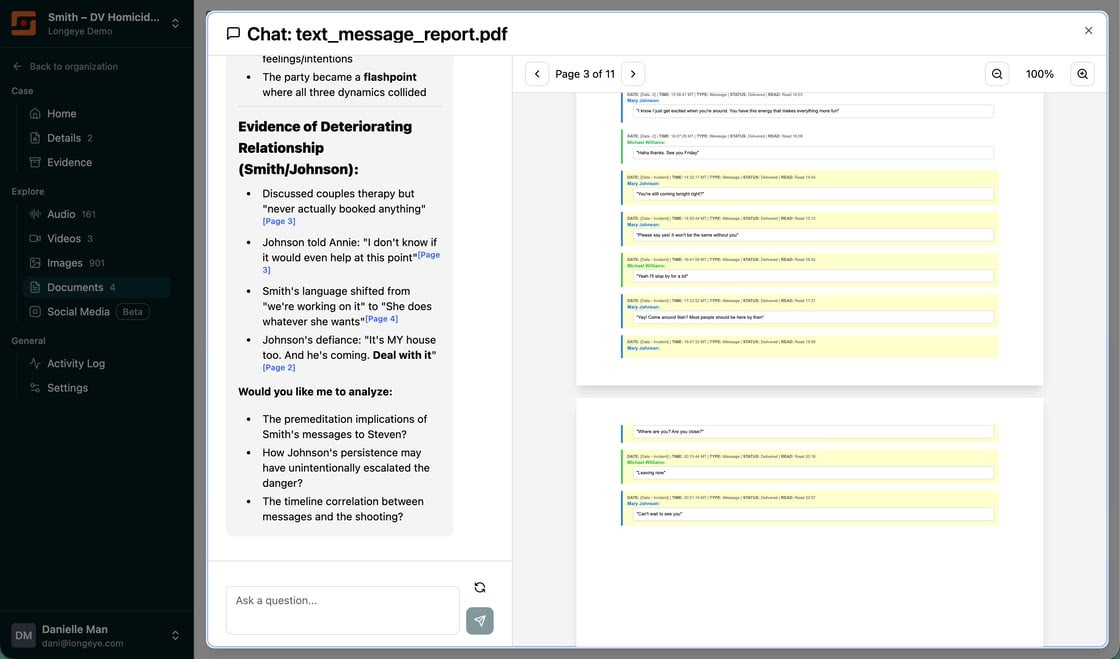
Have you ever had to go through a long PDF document with pages of emails, or maybe a CSV with extensive text messages? Now, these files will show up in the Documents explorer with a "Chat" icon next to them. Interrogate these files like you do your audio, video, and images — with deep-linked citations of course.
## Document Relevance Scores & Improved PDF Parsing
Just like in the other Explorers, Longeye now automatically scores each document based on its content's relevance to the case details you provided. Longeye can flag connections and contradictions across your evidence, and we have improved our PDF processing to also read scanned documents and handwritten notes in your case details.
## Faster Processing
Processing is now dramatically faster. After your files finish uploading, you'll start seeing results within minutes instead of waiting for entire batches to complete.
## Support for All Video Formats
When we first rolled out support for video analysis last month, it only worked for .mp4. Now, we support *all* video formats — .mov, .avi, .mkv, .3gp, .webm, .wmv, .flv, .m4v, .mpeg, .mgp, etc! We're looking forward to hearing about what you find.
## Smarter Audio Analysis
We've made major improvements to transcription accuracy and readability:
- *Case-specific vocabulary:* Longeye now extracts case-relevant keywords for better accuracy with proper nouns and slang
- *"Sounds like" matching:* The system is now trained to allow for less-precise matching, so that you can be certain you don't miss a reference, even when audio quality is poor
- *Improved readability:* Long conversations are now broken up into smaller 20-second segments with intelligent splitting at sentence boundaries, making transcripts easier to follow along when one person is talking for a long time
## Improved Image Explorer
We added a pan & zoom capability to our image explorer and improved its layout so you can easily see each picture's relevance score, relevance explanation, caption, and file name — right alongside the image itself.
## Activity Log
For your IT and compliance teams, we've added an audit log page directly in the app. This will tell you about all core events, like when a new user is added to your account, when new evidence has been uploaded, or when someone's role has changed.
## Upload Improvements
We've made file uploads more flexible and reliable:
- *Drag and drop from anywhere:* Upload files from any page within a case
- *Stay logged in during large uploads:* No need to wiggle your mouse while uploading large bodycam files
- *Better validation:* The Case Details page now redirects to evidence when files are uploaded to it that are only supported for evidence analysis
## Under the Hood
Under the hood, we've been working hard to make initial file processing faster and more reliable, and we have improved your ability to see how file processing is going on the Evidence page with a "Processing files..." indicator. We've also released dozens of small improvements based on your feedback at IACP, including better keyboard shortcuts, clearer role selection, and visual polish across the application.
---
Questions or feedback? We'd love to hear from you! You can reach us at team@longeye.com.
The Longeye Team
---
### September Product Update (2025-09-01)
Hi there! We've been really busy making Longeye even better for your investigations. Here's what's new this month:
## Smarter AI Analysis
We're constantly working to improve how our AI understands your case context. This month, we added a new Case Details page to collect Case Reports, Incident Reports, and other documents with context on the details you may be looking for (see below).
Our AI now looks for these details, like physical descriptions of people, cars, and weapons, in every new piece of evidence you upload. The system will highlight these for you by ranking them with higher relevancy scores.
## New Case Details Page
When working a new case in Longeye, you want to get our AI engine up to speed as quickly as possible. Previously, you'd have to type out the details of what you were looking for in our case description area. But now, you can simply drag & drop your Case Report, Incident Reports, and other contextual information into the Case Details page. We'll will extract the necessary context from those documents and start looking for what you're looking for *automatically*!
## Video Evidence Support
Ever need to search bodycam footage for the moment someone said something? Ever have an interview room video you needed transcribed and summarized?
Now you can upload and analyze MP4 video files! Automatically transcribe videos and translate their audio into English. Watch moments in videos as you listen to their audio tracks, summarize the salient points in seconds, and inquire about who said what & when via Chat. Now you can rip through the key moments of videos just like you do with audio files.
## New Documents Page
As we talk to detectives across the country, we keep discovering new types of documents they have to work with to close cases. Today, we are taking the first step towards being able to handle any type of document by organizing these into our new Documents page. We're looking for your feedback on how you'd like to interact with documents! We will be adding text extraction, translation, and "Chat with file" to PDF documents in the coming weeks.
## Granular Access Control
Is your IT team all over you for for making sure the system stays CJIS compliant? Granular user roles are now available at both the Case and Organization level. You can set users to be Admins, Members, and Viewers.
Longeye's Role Based Access Control (RBAC) features make sure you are always in full control of who can interact with your data, from 911 calls to the courtroom floor. Find these new controls on the Settings pages for your Cases and Organization.
## ZIP File Processing
Warrant returns often come in the form of ZIP files, sometimes even ZIPs of ZIPs, and it can be hard to find the files worth your time. Well... there's no need to unzip these anymore! Just drag them into Longeye as ZIPs and we'll take care of it. We support up to 1000 files per ZIP archive, and files up to 10GB in size. We are always looking for ways to streamline your work!
## Case Bookmarks
Your caseload is massive, and you can't realistically make progress on all your cases at once. We introduced bookmarks on your case list, so you can make sure your work in Longeye reflects the urgency of your work in the community.
Thanks for being part of the Longeye community! We're continuously working to make digital evidence analysis faster and more intuitive for investigators like you.
Questions or feedback? We'd love to hear from you!
The Longeye Team
---
## Legal
### Privacy Notice
Longeye's Privacy Notice describes how we collect, use, and protect personal data. Topics covered include: our role in processing personal data, collection and use of personal data, additional uses, disclosure of personal data, privacy choices, children's personal data, security, and contact information. Last updated August 26, 2025.
Full text available at: https://www.longeye.com/LongeyePrivacyNotice.pdf
### Cookie Notice
Longeye's website uses only strictly necessary cookies for hosting infrastructure. We do not use analytics, advertising, or third-party tracking cookies. Last updated March 27, 2026.
Full text available at: https://www.longeye.com/cookie-policy