Spring brought a large wave of new capability to Longeye. Here’s what we shipped in March.
Tables: Structured Data Analysis with AI ✨
This month we launched Tables, a dedicated workspace for tabular data. We know that every case has an enormous amount of this data, whether it’s activity data from a phone, messages from Snapchat, or records from a GPS tracker.
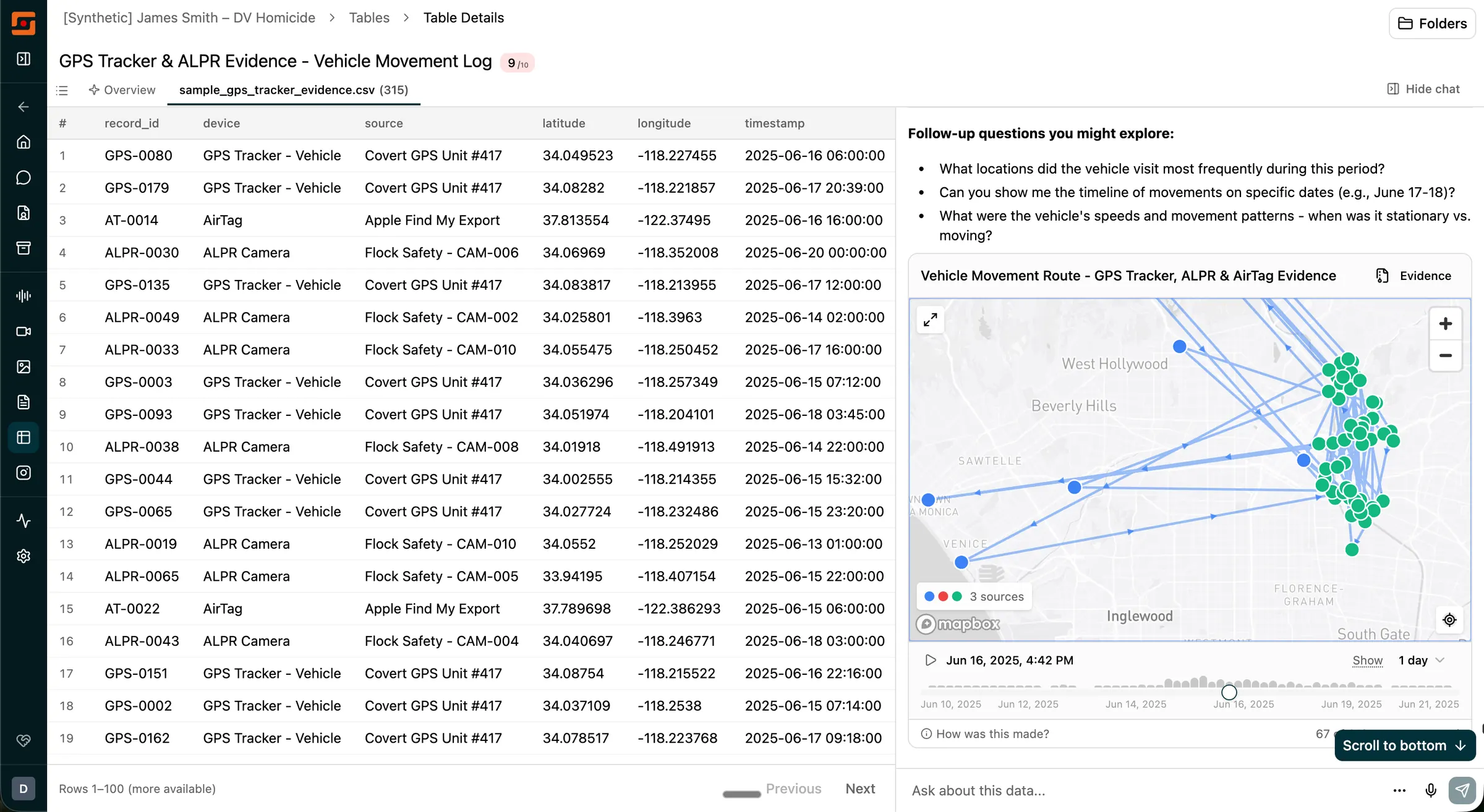
Now you can chat directly with your tables — add columns together with real math, plot trends on charts, or even render routes on a map.
What’s included in the Tables release:
- Cross-file queries. Chat can query across every table in a case simultaneously, not just one file at a time. This makes it practical to work with phone extractions where data spans dozens of related spreadsheets.
- Court-ready evidence packets. We know your evidence needs to be admissible in court. Every time Longeye creates a map or plots a chart, that artifact comes with a downloadable evidence packet that walks you through the exact steps to reproduce it outside of Longeye — so you know exactly how it was made and can make sure it was done right.
- GPX file support. GPS track files from phones and wearables now parse into the Tables view automatically, enabling map-based and time-based analysis alongside other structured data.
- Date range display. Each table shows the temporal span of its data — the earliest and latest dates in any time column — so you immediately know whether a file covers the relevant time period without opening it.
- System table suppression. Phone extractions include many internal system files with no evidentiary value. These are now hidden by default, reducing noise by roughly 86%.
- Persistent table and chart history. Tables and charts generated in Chat are saved in the conversation history and reload when you return to a session.
Images 🖼️
Longeye now extracts text from images automatically. If the text is in another language, it’s translated to English. All extracted and translated text is fully searchable, so you can find images by what’s written in them — regardless of language.
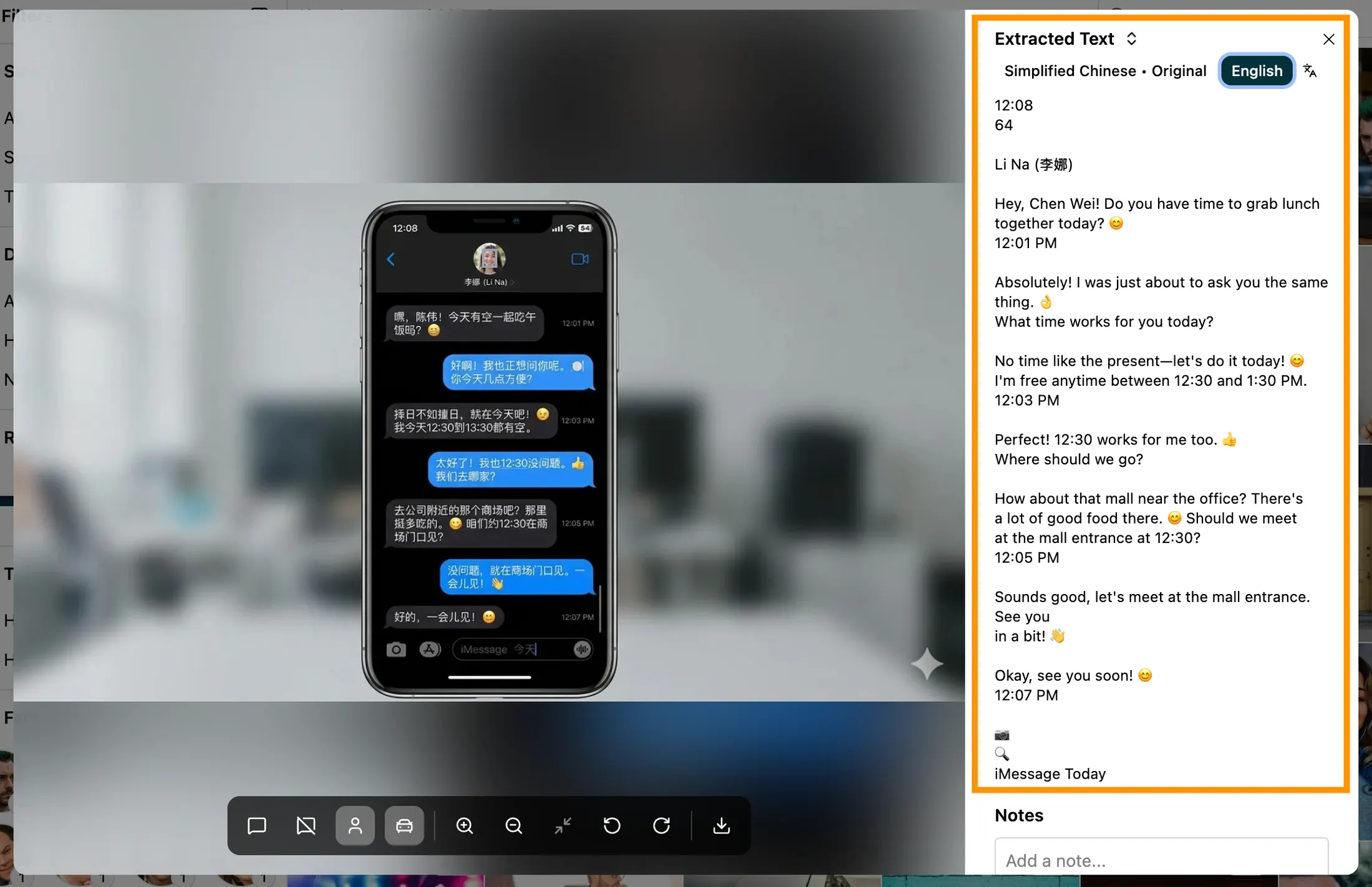
We also made a number of other improvements to images this month:
- Date filter. A new date filter on the Images page lets you focus on photos with or without a capture timestamp, or narrow to a specific date range. Dates are displayed in the case timezone with an indicator when the source timezone is unknown.
- Smarter relevance scoring. Longeye now factors in where a photo lived on the device before scoring its relevance. A photo from the camera roll is treated very differently from one found in an emoji cache or app icon folder. We measured, and it showed a 78x difference in relevance rates based on these signals — you should see noticeably less noise in image results.
- Scroll position indicator. A floating position ticker appears when scrolling through large image sets, showing the current position and offering a “Jump to…” control to skip to any image directly.
Audio and Transcripts
We’re continuing to invest in our bread and butter: audio analysis. You can now edit transcripts and save those edits for your teammates. You can also, finally, give names to the speakers in audio transcripts — so you don’t just see “Speaker 0” and “Speaker 1.” A dropdown shows all existing speakers in a recording, and clicking one renames all their segments in a single step.
We also improved transcript search — you’re less likely to miss results that fall near the boundary of a long recording.
Case Management
Case type. Cases can now be categorized by investigation type — Homicide, DV/Stalking, Fraud, CSA, and nine other categories. The type shows as a badge in the cases list and is filterable.
Case lead. Cases now have an assignable lead, separate from whoever created the case. When a case gets handed off — a detective rotates out, a new analyst picks it up — you can reassign the lead so it shows up in the right person’s “My cases” tab.
Duplicate file detection. Longeye now automatically detects duplicate files across your uploads. When a file has already been processed, we skip reprocessing it entirely — saving you both processing time and usage. Duplicates are flagged on the Evidence page so you always know what’s original and what’s a copy.
Under the Hood
As always, a large part of the month went into performance and reliability. The Images page loads substantially faster on large cases — an 83K-image case that previously took 24 seconds now loads in a fraction of that time. We fixed source path filters that were showing empty results despite correct counts in the sidebar, resolved audio page loading spinners that got stuck when combining filters with deep links, and squashed upload failures caused by filename collisions across nested folders. PDF and large phone extraction processing is more resilient, with fewer timeouts on complex files.
We love hearing how investigators are using these features in the field — if something saved you time on a case or you have an idea for what we should build next, drop us a line. And if you haven’t tried Longeye yet, let’s set up a demo and we’ll walk you through it.